Getting people to your website is only half the battle. The real challenge is turning those visitors into paying customers, and that's a common struggle for many small and local businesses. You see the traffic coming in, but it isn't leading to the sales, sign-ups, or phone calls you need. That gap between a visitor and a customer is where conversion rate optimization (CRO) comes into play.
Think of it as making small, smart changes to your website that persuade more people to take the specific action you want. It’s not about expensive overhauls or getting lost in marketing jargon. Instead, it’s about understanding your audience and systematically removing the roadblocks that stop them from buying from you or getting in touch.
In this guide, we'll break down eight practical, no-fluff conversion rate optimization tips that are straightforward to implement. We’re skipping the generic advice and focusing on actionable steps you can start using today. From testing your headlines to simplifying your forms and optimizing your call-to-action buttons, each tweak is designed to deliver measurable results and help you grow your business one conversion at a time. Let's get started.
1. A/B Testing for Data-Driven Decisions
Guesswork is the enemy of growth. Instead of making changes to your website based on a gut feeling, A/B testing lets you use real user data to make informed decisions. This fundamental practice in conversion rate optimization involves creating two versions of a single page or element, then showing them to different segments of your audience to see which one performs better. By measuring how users interact with each version, you can definitively identify what works and what doesn’t.

The concept is simple: Version A (the "control") is your existing page, and Version B (the "variation") includes the change you want to test, like a different headline, a new call-to-action (CTA) button color, or a revised product description. By tracking which version leads to more sign-ups, sales, or other desired actions, you eliminate speculation and build a website that is proven to convert. Companies like Netflix and Booking.com run thousands of these tests to refine every aspect of their user experience, which shows the power of this data-driven approach.
How to Implement A/B Testing
Getting started with A/B testing is more accessible than ever for small businesses. Several tools can help you set up and manage experiments without needing a developer.
- Start with a Hypothesis: Don't test randomly. Form a clear hypothesis, such as "Changing the CTA button from 'Learn More' to 'Get Your Free Quote' will increase form submissions because it is more specific and value-oriented."
- Test One Element at a Time: If you change the headline, the image, and the button color all at once, you won't know which change caused the increase or decrease in conversions. Isolate your variables for clear, actionable results.
- Ensure Statistical Significance: Let your test run long enough to collect sufficient data. A test that runs for only a day or has too few visitors can produce misleading results. Aim for a confidence level of 95% or higher.
- Use the Right Tools: While Google Optimize is being phased out, its principles live on in tools within Google Analytics 4 and other platforms like Optimizely and VWO. These offer user-friendly interfaces for setting up tests.
A/B testing is a core pillar of any serious conversion rate optimization strategy. It transforms your website from a static brochure into a dynamic, evolving tool that continuously improves its performance based on actual customer behavior.
2. Optimize Call-to-Action (CTA) Buttons
Your call-to-action (CTA) button is the gateway to your conversion goal. It’s the final instruction you give your visitors, so making it clear, compelling, and easy to find is non-negotiable. Optimizing your CTAs involves more than just picking a bright color; it’s about using strategic language, placement, and design to guide users to take the next step. A weak CTA can halt an otherwise perfect user journey right before the finish line.

The difference between a generic CTA and an optimized one can be huge. For instance, a well-known study showed a 21% increase in clicks just by changing a button's color from green to red, which created better contrast against the page. Similarly, another case study saw conversions jump by 90% by changing its button text from the passive "Order Information" to the benefit-driven "Get Instant Access." These examples show that small changes to your CTA are a crucial part of any conversion rate optimization strategy.
How to Implement CTA Optimization
You can start refining your CTAs immediately by focusing on a few high-impact elements. Small tweaks here can yield significant results without requiring a full website redesign.
- Use Action-Oriented, Value-Driven Language: Replace generic words like "Submit" or "Click Here." Instead, use specific, first-person commands that communicate value. Try phrases like "Get My Free Quote," "Start Your Trial," or "Download the Guide."
- Make It Stand Out Visually: Your CTA should be impossible to miss. Use a contrasting color that pops against the background of your page. Ensure the button is large enough to be easily tapped on mobile devices without being obnoxious.
- Create Urgency and Scarcity: Encourage immediate action by incorporating a sense of urgency. Phrases like "Claim Your Discount Now" or "Shop the Sale – Ends Tonight" motivate users to act before they miss out.
- Place It Strategically: Your primary CTA should be visible "above the fold" so users see it without scrolling. For longer pages, it’s a good practice to repeat the CTA at key decision-making points.
By treating your CTA as a key conversion tool rather than just a design element, you can create a powerful and persuasive final prompt that encourages more visitors to become customers.
3. Improve Page Loading Speed
In the digital world, every second counts. Page loading speed, the time it takes for all content on your page to appear for a user, is a critical factor in the user experience. A slow website frustrates visitors and sends a signal of unprofessionalism, causing them to leave before they even see your offer. Optimizing your site's speed is a technical but essential practice that directly impacts your bottom line by reducing bounce rates and keeping potential customers engaged.
The data is clear: faster pages convert better. Major retailers have quantified the cost of a slow site for years. For instance, Walmart discovered that for every one-second improvement in page load time, conversions increased by 2%. Similarly, Amazon calculated that even a 100-millisecond delay could cost them 1% in sales. These statistics highlight a non-negotiable truth for businesses of all sizes: a slow website is a conversion killer. This bar chart visualizes the dramatic impact that even small changes in load time can have on conversion rates.
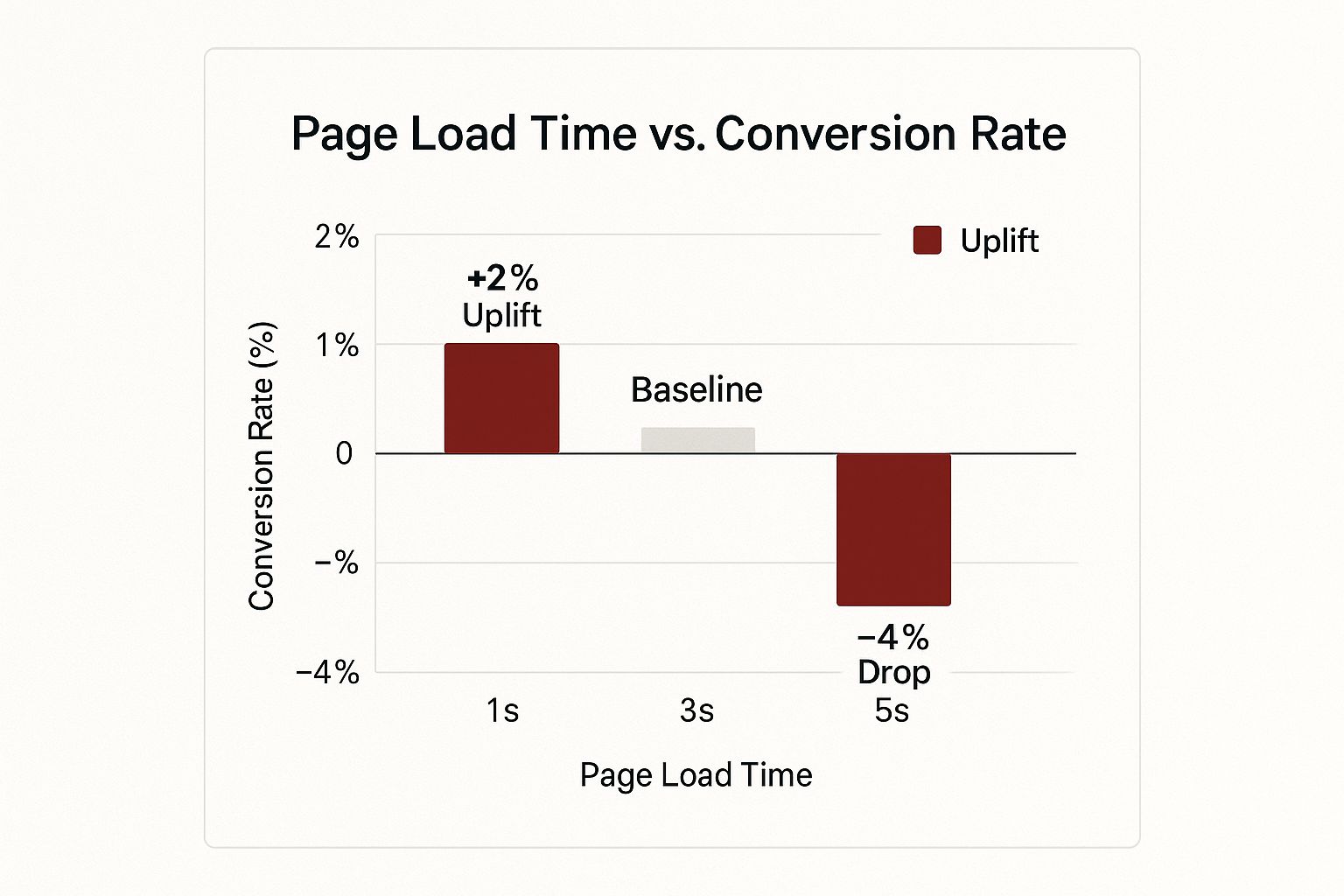
The chart clearly shows that decreasing load time from a baseline of 3 seconds to just 1 second can provide a significant uplift, while an increase to 5 seconds causes a substantial drop in conversions.
How to Improve Your Page Speed
You don't need to be a top developer to make meaningful improvements to your website's loading time. Several practical steps can deliver immediate results.
- Analyze Your Current Speed: Before you can improve, you need a baseline. Use free tools like Google PageSpeed Insights or GTmetrix to analyze your site. They provide a performance score and specific recommendations.
- Compress Your Images: Large image files are one of the most common culprits of slow pages. Use tools like TinyPNG or the built-in features of your website platform to compress images without a noticeable loss in quality.
- Enable Browser Caching: Caching stores parts of your website on a visitor's browser, so it doesn't have to reload everything on subsequent visits. This dramatically speeds up the experience for repeat visitors.
- Choose Quality Hosting: A cheap, slow hosting provider can undermine all your optimization efforts. Investing in a reliable and fast hosting service is a foundational step for good performance.
Improving page speed is one of the most effective conversion rate optimization tips because it enhances the user experience from the very first interaction. It ensures your carefully crafted sales copy and calls-to-action actually get a chance to be seen.
4. Simplify Forms and Reduce Friction
Every field in your sign-up or checkout form is a potential roadblock. The more information you ask for, the more effort you demand from your users, and the more likely they are to abandon the process altogether. Simplifying forms is a powerful conversion rate optimization tip because it directly reduces friction. It makes it easier for users to complete the desired action, whether that's making a purchase, signing up for a newsletter, or requesting a quote.
This strategy involves critically evaluating every field and eliminating anything that isn't absolutely necessary for the initial conversion. The impact can be immense. For example, Expedia famously increased annual profits by $12 million simply by removing one optional field, "Company Name," from their booking form. Another company saw a 35% jump in conversions by cutting their form from four fields down to three. These examples prove that a less-is-more approach leads to a smoother user experience and higher completion rates.
How to Optimize Your Forms
You can streamline your forms and minimize user frustration by adopting a few key design principles. This makes the process faster and more intuitive for your customers.
- Ask Only for Essential Information: Do you really need a phone number for a newsletter sign-up? Scrutinize every field and cut anything you can collect later. The goal is to get the user to the "submit" button with minimal effort.
- Use a Single-Column Layout: Multiple columns can disrupt a user's vertical rhythm and create confusion about the order of fields. A single, linear path is easier and faster for users to follow.
- Implement Real-Time Validation: Don't wait until a user clicks "submit" to tell them they made a mistake. Use inline validation to provide instant feedback, showing a green checkmark for correct entries and a clear error message for incorrect ones.
- Use Progress Indicators for Multi-Step Forms: If your form must be long, break it into smaller, logical sections. A progress bar shows users where they are in the process and how much is left, which reduces anxiety and encourages completion.
5. Add Social Proof and Trust Signals
People are naturally influenced by the actions and opinions of others. When customers are unsure about making a purchase, they look for confirmation that they're making a good choice. Social proof and trust signals provide that reassurance by showing that other people have bought from you, used your service, and had a positive experience. By strategically displaying reviews, testimonials, and trust badges, you build credibility and reduce the perceived risk for new buyers.
This psychological principle is one of the most powerful tools in conversion rate optimization. When a potential customer sees that your business is trusted by others, it immediately lowers their guard and makes them more receptive to your offer. For example, Booking.com uses this effectively by showing how many people are currently viewing a hotel or how many rooms have been recently booked, creating a sense of urgency and trust. Similarly, a software company might display logos of well-known companies that use its product, leveraging their authority to build its own.
How to Implement Social Proof
Adding trust signals to your site doesn't have to be complicated. The key is to make them visible and authentic to build confidence at critical points in the customer journey, like on product pages or at checkout.
- Display Customer Reviews and Ratings: Prominently feature star ratings and written reviews near product descriptions. Using recognized third-party platforms for this can add even more credibility.
- Showcase Specifics, Not Vague Claims: Instead of saying "satisfied customers," say "Trusted by over 10,000 happy customers." Specific numbers are more believable and impactful.
- Use Visuals with Testimonials: Adding a photo of the customer next to their quote makes it far more genuine and relatable. A face adds a human element to the text.
- Feature Trust Badges and Security Seals: Displaying logos from recognized payment providers (Visa, PayPal) or security companies (Norton, McAfee) on your checkout page can significantly reduce cart abandonment by reassuring customers that their information is safe.
- Leverage User-Generated Content: Encourage customers to share photos of themselves using your product on social media and feature these authentic images on your website.
Social proof is essential for building a strong brand reputation and turning hesitant visitors into confident buyers. Consistently managing and displaying these trust signals is a fundamental part of an effective marketing strategy. Find out more about online reputation management best practices to maintain a positive brand image.
6. Implement Exit-Intent Popups
Losing a visitor just as they're about to leave your site feels like a missed opportunity. Exit-intent popups offer a powerful second chance to capture their attention. This technology tracks a user's mouse movements and triggers a targeted message or offer the moment their cursor moves towards the back button or to close the browser tab. It is a last-ditch effort to re-engage a departing visitor and convert them into a subscriber or customer.
Instead of letting a potential customer disappear forever, an exit-intent popup can present them with a compelling reason to stay. This could be a discount on their first purchase, a free downloadable guide, or an invitation to join your newsletter. The goal isn't to annoy the user, but to make a final, valuable offer that addresses a potential reason for their departure. When done right, these popups can recover 3-9% of abandoning visitors, turning them into tangible leads.
How to Implement Exit-Intent Popups
Many user-friendly tools allow small businesses to create and deploy these popups without any coding knowledge. The key is to make your offer strategic and valuable.
- Offer Genuine Value: Don't just ask for an email. Offer something substantial in return, such as a 15% discount code, a free shipping coupon, or an exclusive ebook relevant to your industry.
- Create a Compelling Headline: Grab their attention immediately. Use a question or a direct benefit statement, like "Before You Go, Get Your Free Checklist" or "Wait! Don't Miss Out on 10% Off."
- Keep the Design Simple and Focused: The popup should have a clear headline, a brief description of the offer, a single form field (usually for an email), and a prominent call-to-action button. Don't overwhelm the user.
- Ensure an Easy Exit: Always provide a clear and obvious way for users to close the popup if they are not interested. A hard-to-find "X" button creates a negative user experience.
Exit-intent popups are one of the most effective conversion rate optimization tips for capturing leads that would otherwise be lost. By providing a timely and relevant offer, you can convert abandoning visitors into loyal followers and customers.
7. Optimize for Mobile Devices
In an era where smartphones are nearly always within arm's reach, a poor mobile website experience is a direct path to lost revenue. Optimizing for mobile devices means ensuring your site is not just viewable, but fully functional and enjoyable on smaller screens. This involves everything from responsive design and touch-friendly navigation to lightning-fast load times. Neglecting this is no longer an option, as a majority of internet traffic now originates from mobile devices.
The goal is to create a seamless experience for users on the go. When a potential customer struggles to read text, tap a button, or fill out a form on their phone, they will simply leave. Companies that prioritize mobile see huge returns; for example, one major car marketplace saw a 50% jump in mobile conversions after optimizing their experience. A mobile-first mindset is a critical component of modern conversion rate optimization tips, as it meets customers where they are most active.
How to Implement Mobile Optimization
Making your website work brilliantly on mobile is a strategic process that goes beyond just shrinking your desktop site. It's about rethinking the user journey for a different context.
- Implement Responsive Design: This is the foundation. A responsive website automatically adjusts its layout, images, and content to fit the screen size of any device, providing a consistent experience for all visitors.
- Simplify Navigation: Mobile users need clear, simple paths. Use a "hamburger" menu, prioritize key pages, and ensure buttons and links are large enough to be easily tapped with a thumb.
- Prioritize Speed: Mobile users are impatient. Compress images, leverage browser caching, and minimize code to ensure your pages load in three seconds or less. Every second of delay directly impacts your conversion rate.
- Use Mobile-Specific Features: Enhance the experience with features unique to mobile devices. Implement click-to-call buttons for easy contact, and use GPS for location-based services like finding your nearest store.
- Test on Actual Devices: Emulators in web browsers are helpful, but they don't replicate the real-world experience. Test your site on a variety of popular smartphones and tablets to find and fix usability issues.
By treating your mobile website as a primary touchpoint, you cater to the modern consumer's habits and dramatically increase your chances of turning a visitor into a customer.
8. Create Compelling Headlines and Value Propositions
You have less than three seconds to capture a visitor's attention. If your headline and value proposition fail to immediately answer "What's in it for me?", that visitor will leave. Optimizing this core messaging is one of the most impactful conversion rate optimization tips because it sets the stage for the entire user experience. A strong value proposition clearly communicates the unique benefit a customer will receive from your product or service, differentiating you from the competition.
This isn't just about clever wording; it's about clarity and relevance. Think of Slack’s classic headline: "Be more productive at work with less effort." It directly addresses a major pain point and promises a tangible outcome. Similarly, Dropbox's simple "Your stuff, anywhere" instantly communicated its core benefit of file accessibility. These examples prove that a concise, benefit-driven message resonates far more effectively than a list of technical features. Getting this right is crucial for keeping users engaged long enough to explore the rest of your page.
How to Craft a High-Converting Headline
Your headline is your first and often only chance to make an impression. It must be clear, compelling, and focused on the user’s needs.
- Lead with the Primary Benefit: Don't sell the drill; sell the hole. Instead of saying "We offer premium dog food," try "Give Your Dog a Healthier, Happier Life." Focus on the result the customer wants.
- Address a Core Pain Point: Directly speak to the problem your audience is trying to solve. A headline like "Stop Wasting Time on Manual Invoicing" immediately grabs the attention of frustrated business owners.
- Use Numbers and Specifics: Quantifiable results add credibility. "Join 10,000+ Small Businesses That Automated Their Marketing" is more powerful than "Join Our Community."
- Keep It Concise: Aim for clarity over cleverness. A headline should be easily understood in a few seconds. An overly complex or vague message will just confuse potential customers.
A strong headline is a cornerstone of both user experience and search engine visibility. Learning how to craft powerful titles for small business SEO ensures your message connects with both people and search algorithms, driving more qualified traffic to your site.
Conversion Rate Optimization Tips Comparison
| Strategy | Implementation Complexity 🔄 | Resource Requirements ⚡ | Expected Outcomes 📊 | Ideal Use Cases 💡 | Key Advantages ⭐ |
|---|---|---|---|---|---|
| A/B Testing for Data-Driven Decisions | Moderate to High (statistical setup, traffic needs) | Medium to High (tools, traffic volume) | Reliable optimization with measurable ROI | Websites with sufficient traffic for testing | Data-driven, reduces risk, supports continuous improvement |
| Optimize Call-to-Action (CTA) Buttons | Low (design and copy tweaks) | Low (design resources) | Quick wins with significant conversion uplift | Any marketing asset requiring user action | Fast impact, low cost, easy testing |
| Improve Page Loading Speed | High (technical skills required) | High (development and tools) | Enhanced UX, lower bounce, better SEO and conversions | Sites needing faster user experience | Improves SEO, reduces bounce, boosts conversions |
| Simplify Forms and Reduce Friction | Low to Moderate (UX design and dev) | Medium (design, validation setup) | Higher form completion, better lead quality | Lead capture and signup forms | Greatly increases conversions, improves UX |
| Add Social Proof and Trust Signals | Low to Moderate (content gathering) | Low to Medium (content creation) | Increased trust, credibility, and conversion lift | E-commerce, service pages, trust-building | Builds instant trust, leverages psychology |
| Implement Exit-Intent Popups | Moderate (integration and targeting) | Low to Medium (tools and design) | Recovers abandoning visitors, grows email lists | Sites with high exit rates | Recovers lost conversions, cost-effective |
| Optimize for Mobile Devices | High (responsive design, testing) | High (development and QA) | Better mobile UX, higher mobile conversions | Mobile-heavy traffic sites | Captures growing mobile users, improves SEO |
| Create Compelling Headlines and Value Propositions | Low to Moderate (copywriting and testing) | Low (copy resources) | Immediate visitor impact, better qualified leads | All landing pages and marketing assets | Clear value messaging, easy to test and update |
Ready to Start Converting?
You've just navigated through eight powerful strategies designed to transform your website from a digital brochure into a high-performing conversion engine. We've covered the essentials, from the data-driven precision of A/B testing and the magnetic pull of optimized CTAs to the foundational necessity of lightning-fast page speeds and seamless mobile experiences. Each of these conversion rate optimization tips represents a significant opportunity to better serve your visitors and, in turn, grow your business.
The journey to a higher conversion rate isn't about a single, magical fix. Instead, it's a continuous cycle of listening, testing, and refining. It’s about understanding the human psychology behind a click, the frustration of a slow-loading page, and the reassurance provided by a glowing customer testimonial. By embracing this mindset, you move from guessing what your customers want to knowing what they need and delivering it flawlessly.
Your Action Plan for Higher Conversions
Feeling motivated but not sure where to begin? Don't let the number of options lead to inaction. The key is to start small and build momentum.
- Pick Your Starting Point: Review the eight tips and identify the one that addresses your website's most obvious weakness. Is your contact form long and complicated? Start by simplifying it. Do you lack customer reviews? Focus on gathering and displaying social proof.
- Set a Measurable Goal: Instead of just "improving conversions," aim for something specific, like "increase form submissions by 10% in the next 30 days" or "reduce cart abandonment by 5% this quarter."
- Test, Measure, Repeat: Implement your chosen change and use analytics to track the impact. Whether you're A/B testing a new headline or adding an exit-intent popup, data will be your most reliable guide. Let the results tell you what’s working, and don't be afraid to pivot if an idea doesn't pan out.
Mastering these concepts is more than a technical exercise; it's a fundamental shift in how you approach your digital presence. It empowers you to make every visitor count, maximize the return on your marketing efforts, and build a stronger, more profitable business. You’ve invested time and resources into driving traffic to your site; now is the time to ensure that traffic translates into tangible results. Start with one small change today, and you'll be on your way to building a website that consistently works as hard as you do.
Feeling overwhelmed or want an expert to accelerate your growth? The team at Digital Lotus Marketing specializes in implementing these exact conversion rate optimization tips for local businesses like yours, crafting data-driven strategies that turn website visitors into loyal customers. Let us help you unlock your website's true potential.